
See before you go
You're looking at the real thing.
Tap any pin and it's the actual photo someone took standing there — not a stock image, not a star rating. You know what a spot really is before you ever leave.

You'll look at them anyway. Every pin is a real photograph, not a listing. Google Maps tells you the place exists. Photerra shows you what it looks like from where someone stood — in that light, on that day. See it before you go, then plan a trip around it without leaving the app.
A live preview of Photerra's map. See all cities →
The places you find here are real, the ranking is honest, and what's yours stays yours. Not a settings toggle — it's how Photerra is built.
Every spot is a real picture a real person took — never AI-generated.
Nobody pays to appear on the map or to rank on it. What you see is what travelers actually loved. The booking links are affiliate links, marked as ads in the app, and they never change which places you see.
Not to advertisers, not to data brokers, not to anyone.
Your location shows what's nearby in the moment, then it's forgotten.
Edit or delete any spot, or your whole account, whenever you want. You're never locked in.
Share spots without your name attached to them.
The bench where the light is perfect at 6pm. The cove past the parking lot. The mural on the side of the laundromat. None of them are business listings — so the apps built on business listings can't show them to you. Photerra pins them where someone stood.
Google Maps, the AI planners, the big travel sites — all drawing from the same pile of business listings and reviews. That's why they hand you the same ten places.
One real photo at a time, pinned where it was taken — close enough to walk to, from someone who was actually standing there.
She has 12 tabs open across Google Maps, Instagram, blogs, and three group chats — and every one shows her the same 30 places, none of which she can actually see. Twelve tabs isn't a speed problem. It's a trust problem.
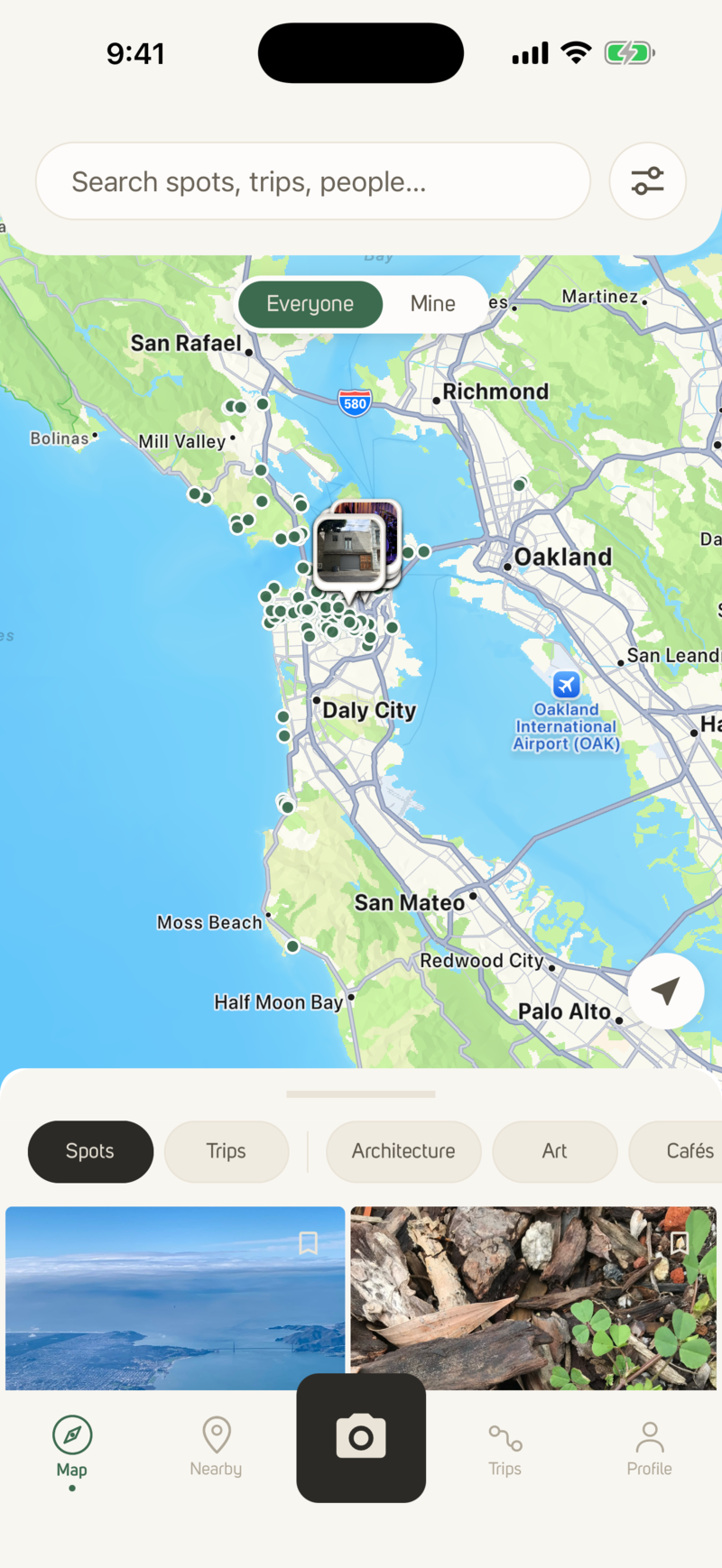
The map is photographs, not listings — places shared by travelers and open archives, each one pinned about where the camera was. Hundreds of them in one view, and she can see every one before she goes.

Tap a pin and the photo says what it is: the place, when it was taken and who took it, where the photograph carries that — and where it came from. She knows what she's walking to, not what a listing says about it.
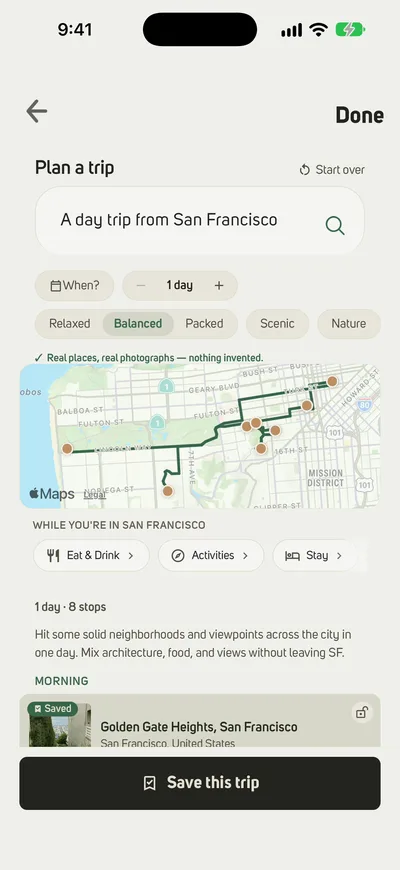
Her saved spots become a day-by-day plan with her stays and plans alongside. Or she describes the weekend — "quiet viewpoints and good coffee" — and the trip builder assembles it from photographed places. Not a top-10 list.

The route draws itself around real stops, split into days by how far she's going. Tables, stays and rides are a hand-off to partners, clearly labelled — one tap opens them, and Photerra never sells a spot.

One map instead of twelve tabs. Every stop is a photograph, so she knows what she's walking to — and she can share it, tweak it on the go, and hand the bookings off to partners in a tap.
Search it by the light. Let the AI plan from it. Build a trip with friends, then hand off to booking partners when you're ready. Every one of these is better because the spots underneath are real — not a scraped directory.
Tap any pin and it's the actual photo someone took standing there — not a stock image, not a star rating. You know what a spot really is before you ever leave.
"A weekend of quiet viewpoints in Portland." "Three days of good light and long walks in Mexico City." The AI pulls from real photo-spots — every one a photograph taken where it's pinned — so what you get back reflects where people actually went.
Every spot you add builds your personal travel map — and reveals your travel type. See the places you were the first to put on the map, how you rank among fellow travelers, and share a card worth showing off.
Going from A to B — a road trip from San Francisco to Portland, a walk across a city, a bike ride through the hills — Photerra plans the real photo-spots worth stopping for along the way, split into days by how far you're going. How road trips work →
Point Photerra at the photos from a trip you already took, and it rebuilds it on your map — day by day, in order. It even finds the places that aren't on Photerra yet, so you can add them for the next traveler.
470+ in San Francisco. 610+ in Portland. 140+ in Mexico City. We go deep in a few cities before we go wide — so the map is useful the day you open it.
Drag spots into days. Auto-optimize routes. Invite your group to plan it with you.
OpenTable, Resy, Booking.com, Airbnb, Hostelworld, Hipcamp, Skyscanner, Viator, GetYourGuide, Uber, Lyft — restaurants, stays, flights, activities and rides, one tap from any spot. You book with them; we hand you over.
Add 5, 50, or 100 photos at once. Each lands at the coordinate where you took it. Where a photo carries its location, the photo is the entry; where it doesn’t, you fill in what’s missing once and move on.
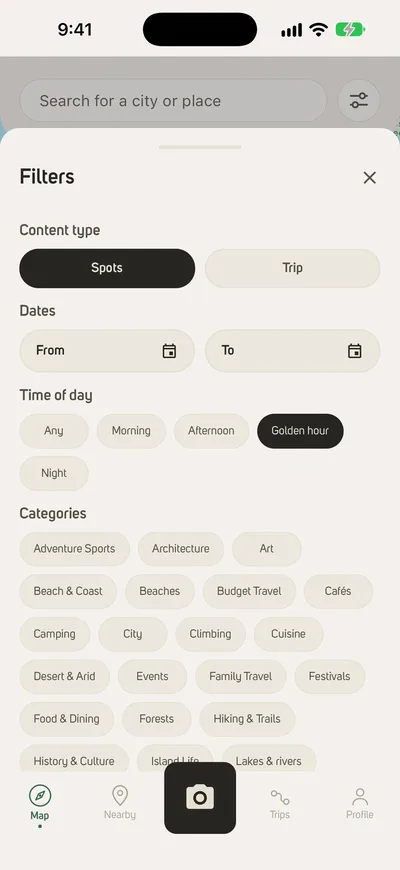
Every spot is a real photo, and most carry the time they were taken. Filter for morning, golden hour, or evening — and find the places worth being at the right time.
A map is only useful when it's dense — so we go deep before we go wide. These are a few of the places where travelers have already built that depth; there are 32 in all.
Want a city next? Tell us where you'd like to explore →
Yes. The app is free to download and all the core features — browsing the map, saving spots, building trips, inviting friends — are free. We make money on the affiliate side when you book a flight, hotel, restaurant, or campsite through the app. You're never charged for a spot.
You can browse the pre-seeded map without an account. To save spots, build trips, upload your own photos, or plan with friends, you'll need a free account — email or Apple/Google sign-in.
Photerra's community has mapped destinations across the US, Mexico, Europe, Asia and Australia — from San Francisco, Portland and Los Angeles to Rome, Kyoto, Sydney and Mexico City — each with its own page of real photo-spots, plus dozens of areas just getting started. Browse every destination →
You can still use the app — upload your own spots and build trips anywhere. The AI planner plans from mapped photographs, so where Photerra hasn't reached yet it says so and points you to the nearest mapped places instead of inventing an itinerary. The seeded cities are just where there's already a dense community layer to discover from. If enough travelers in a city start posting, it becomes the next hub.
Not yet. Photerra needs a connection to load spots, maps and trips. You can export an itinerary as a PDF before you leave, which is readable without data.
Tell it where you're going and what you want ("quiet viewpoints," "good light for photos," "where locals gather"). It builds a day-by-day itinerary from real photo-spots — not generic lists. Refine with prompts or edit by hand.
Yes. Trips are collaborative — invite friends and everyone can add, reorder, or comment on spots. Photerra auto-calculates routing, distances, and travel times across days.
Only the photos you choose to post become spots. If you turn on the camera-roll scan, Photerra reads the location tags and dates already saved in your photos to build your private travel map — your photographs themselves never leave your phone, and only a coarsened summary is synced (privacy policy §3.4). A photo you post is pinned to the coordinate where you took it, and an AI sorts what's in it (a viewpoint, a quiet spot, good light) so other travelers can find it. You're always the owner: edit or remove any spot, or your whole account, anytime.
Every spot you share becomes part of a map no business directory can build. Help map it — start with your own camera roll.
No sponsored spots. No paid rankings. No account required to browse.